Skip to content

Menu
  • Batch Programs: Making IT Automated.
  • Networking: Cisco and Dell N-Series L3 EtherChannel
  • VMware: Custom TCP/IP Stacks in VMware ESXi 6.0
  • Database fragmentation Percentage Query
  • Database re-indexing query
  • Desktop LAN Connection: develops the “(unauthenticated)” error
  • Equallogic Management: Mapping the SAN to a VM
  • Fully automated SQL Server Restore Script
  • Group Policy: Performance tweaks for 14% less memory usage
  • Home Lab
  • Home Lab 2.0: It’s evolved….
  • How to Check Local Group Policies Applied from Domain Controllers
  • How to Fix a Corrupt Profile in a Windows domain for a Server or Desktop
  • IPv6 General Transmit Failure bug
  • Microsoft SQL 2008 R2 won’t let you login after a server reboot…but why?
  • Outlook won’t allow you to send a attachment: here is a solution.
  • VMware: Physical to Virtual Conversion – All I need to do is a P2V right?
  • RAID Calculator
  • Restarting a Windows Printer Spooler Properly
  • Restoring a SQL database to another server from a SQL Backup
  • Setting Persistent Routes in a Windows PC/Server/VM that has Multiple Network Adapter’s for Multiple vLAN’s
  • Setting up a Login Script for Acitve Directory from the Sysvol (NETLOGIN) folder
  • SQL: Procedure sp_executesql: expects parameter ‘@statement’ of type ‘ntext/nchar/nvarchar’
  • Windows: Terminal Services GPO: Deploying Roaming Profiles, User Home Directory, and Session management
  • Windows: Terminal Services – Creating a Terminal Server Farm
  • Networking: Update a Cisco IOS on a Router
  • Networking: Upgrading Cisco IOS on a Catalyst 3750G L3 Switch
  • VMware vCenter: Physical or Virtual, you choose!
  • vForum 2015 – November 3rd – NYC
  • Virus Removal Guide
  • VMUG NY/NJ 2015
  • VMware Hardware Compatibility List
  • VMware Snapshot’s can be good but are also bad if left unchecked.
  • VMware vSAN: From Procuring the hardware, to Configuring the hardware, to Deploying vSAN, to Migrating VM’s in the Home-Lab (2 month weekend warrior project)
  • VMware: Setting up vLAN’s within a ESXi host for inter-vlan traffic
  • VMware: Time, what is this about time?
  • vSAN: Making a Dell R610’s PERC 6/i support SSD’s for VMware’s vSAN
  • Windows Domain Controller Operations Masters Placement and Verifying Windows Server “Operations Masters”
  • Windows Server/Desktop Performance Tweaks
  • Windows Updates: C:\ drive runs out of space, but why?
  • Windows Vista/7: Trust relationship between workstation and domain fails
  • Networking: Cisco and Dell N-Series L3 EtherChannel
  • Networking: Update a Cisco IOS on a Router
  • vSAN: Making a Dell R610’s PERC 6/i support SSD’s for VMware’s vSAN
  • VMware vSAN: From Procuring the hardware, to Configuring the hardware, to Deploying vSAN, to Migrating VM’s in the Home-Lab (2 month weekend warrior project)
  • Restarting a Windows Printer Spooler Properly
  • Setting up a Login Script for Acitve Directory from the Sysvol (NETLOGIN) folder
  • Networking: Setting up a 1 to 1 NAT with a WAN firewall rule on a Sonicwall
  • Networking: Setting up a SSL-VPN on a Sonicwall
  • Windows: Password Policy for Terminal Services
  • Windows: Server 2003 RDC error: “The RPC is unavailable”
  • Windows: Windows Authentication Error when connection to Windows Server 2016 from Windows 7
  • Windows: RepAdmin Commands to resolve Active Directory Replication issues
  • VMware: ESXi 6.5 Standby uplink bug for enabling non-vDS multipathing in Web Client
  • VMware: Converting Windows 2000 NT produces a “inaccessible_boot_device” error
  • Windows: Terminal Services – unexpected server authentication certificate error
  • VMware: vCSA Console won’t accept updated password, what do you do?
  • VMware: Setting up the NSX manager from CLI
  • Windows: How To activate Windows via Command Prompt
  • Cyber Security: Why is a SIEM solution important?
  • Cyber Security: Nmap commands for recon discovery during a vulnerability or penetration assessment
  • Cyber Security/Windows: Everyday security for RD[Protocol], but how?
  • Cyber Security/Networking: How to setup a Mirror port on a Cisco switch for use with a SIEM device
  • Cyber Security: How to use Wireshark
  • Windows: Enabling Schema Module for movement of FSMO role
  • Windows Server 2016/2019: How to fix a AD Replication Error 5
  • Cyber Security/Networking: Common Ports
  • Cyber Security: Test your AV!
  • Cyber Security/Networking/Windows: Is 802.1X important?
  • Cyber Security: So you say your using a complex password, are you really sure?
  • Windows/Cyber Security: Session Inactivity and Auto-logoff Policy
  • Cyber Security: Recommendations for Secure TLS
  • Cyber Security: Types of EAP Frameworks
  • Cyber Security: Types of Encapsulation used with EAP’s
  • Cyber Security: Secure-by-Design Recommendations
  • VMware/Networking: How to enable VLAN Guest Tagging with a Netgear M4300 Series switch and Windows Server 2016 with VMware ESXi 6.0
  • Cybersecurity: How do you check a file to verify it’s integrity?
  • Cyber Security/Windows/Networking: All-In-One Technical Toolkit
  • Cyber Security/Windows: Secure time for your Windows Server
  • Windows/Cyber Security: Enabling DNSSEC/DNS Sockets for greater DNS Integrity & Cache protection
  • Cyber Security: Enterprise Security Disciplines
  • Cyber Security: Risk Vocabulary
  • Windows/Cyber Security: Terminal Services Lockdown Policy
  • Cyber Security: Policy, Procedures, AND Processes OOO MY! O.O
  • Windows: GVLK Public keys
  • Windows: Server 2019 Time zone won’t change
  • VMware: Deploying Intel X710 DA2 CNA w/ v2.0.7 in ESXi 6.7U2/U3
  • Windows: Setting up “In-Motion” encryption on SMB-based files
  • Windows: Deploy a Domain Controller via Powershell
  • Windows: Deployment of a Nano Server with DNS
  • Windows: Prerequisites for a Nano Server
  • Windows: Deployment of Windows Server Core
  • Windows: Creating an Offline Root CA
  • Windows: Creating a Enterprise Subordinate CA of an Offline Root CA
  • Windows: Creating a Enterprise Subordinate (Policy) CA of an Offline Root CA for an Issuing CA
  • Windows: Creating an Issuing CA of a Enterprise Subordinate (Policy) CA
  • Windows/Cyber Security: What can you use PKI-based certificates for and how can they help with security?
  • Windows: Updates breaking your application? …Deploy a WSUS Server! (GUI-Based)
  • Windows: Updates breaking your application? …Deploy a WSUS Server! (Core-Based)
  • Windows/Cyber Security: Integration of Active Directory Services into a Sophos UTM using LDAP
  • Windows: Slow remote site login? …Enabling BrachCache might help!
  • Windows: Key Management Service – Software Licensing Manager
  • Windows: Moving Operation Master (FSMO) via Powershell
  • Windows: My C: Drive keeps filling up after each update on my server! …Maybe your WinSxS folder needs a clean up!!!
  • Windows: Create a Windows Server 2016 .wim image
  • Windows: How to create an Answer File with Window System Image Manager (SIM)
  • Windows: Using a System Imaging Manager (SIM) Answer file with System Preparation Tool (Sysprep) to create Server 2016 Template
  • Windows: Using the Microsoft Assessment and Planning toolkit (MAP) to take inventory of your network and to make improvements
  • Networking: How to setup a SNMP Community String on a Netgear switch
  • Windows: NTFS vs ReFS and example use cases for each
  • Storage: iSCSI vs FC
  • Storage: Best practices around iSCSI storage
  • Windows/Powershell: Automating the configuration of the 1st Domain Controller for a new domain
  • Windows/Powershell: Automating the configuration of a Secondary Domain Controller for a newly created domain
  • Windows: Creating a Pristine Image (.wim) with Microsoft Deployment Toolkit
  • Windows/Group Policy: The Importance of using the Loopback Policy
  • Windows/Powershell: Changing Remote Desktop Protocol Port based on Servers in a User Defined OU
  • Cyber Security/Networking: How to setup a Mirror port on a Netgear M4300 for use with a SIEM device
  • Cyber Security: Setting up a rule on a Sophos XG firewall to allow only internal DNS forwarder resolution
  • Cyber Security: Setting up a syslog collector on a Sophos XG firewall
  • Windows/Powershell: Automating the configuration of Windows Server Update Server (WSUS)
  • Windows/Powershell: Automating the configuration of a File Server with AES-CCM-based Signing and Encryption
  • Windows/Powershell: Automating the configuration of Print Server
  • Windows/Powershell: Automating the configuration of an Offline Root CA
  • Windows/Powershell: Automating the configuration of an Enterprise Intermediate CA joined to a Offline Workgroup Root CA
  • Windows/Powershell: Automating the configuration of DHCP Server with DNS
  • Windows/Powershell: Automating the configuration of 14 day Inactive User Query
  • Windows/Powershell: Automating the configuration of 1 months Inactive User Query
  • Windows/Powershell: Login and Logoff script for Users on a specific computer from a specified date
  • Windows/Powershell: Migrating Users in Windows Server 2008 R2 Active Directory to Server 2016 Active Directory
  • Windows/Networking: So called ‘Rogue DHCP’ can cause all your wonderful new-domain-in-series-with-old-domain plans to go up in smoke! … or you can do this!
  • Windows/Powershell: Allow ICMP through the default Windows Advanced Firewall to allow for pinging
  • Windows/Powershell: Allow printers on a printer server to be ‘list in the directory’ and change the default ‘autodetect’ print drivers
  • Windows: Folder Redirection Policy
  • Windows: KB4534271 Has Broken GPO Processing and Corrupt gpt.ini
  • Storage Best Practices
  • Windows/Cyber Security: Basics for deploying certificates via Windows Server Active Directory Certificate Services
  • Windows: Powershell Execution Policy & TLS 1.2 bypass
  • Windows/Cyber Security: types of system service accounts
  • Windows: Server Cleanup Script
  • Windows/Cyber Security: How to remote enable RDP on a server when you forget to enable RDP
  • Windows: Ultimate All-in-One IT Troubleshooting Toolkit script
  • Windows/Azure: Creating a Multi-forest integration with Azure with Azure AD Connect and custom UPN Suffix or Email attributes
  • Windows: How to Cleanup Metadata after a tombstoned or orphaned Domain Controller creates artifacts in your Active Directory Domain
  • Windows: Migrating from FRS to DFS-R
  • Windows/Cyber Security: Enable RRL to help mitigate DNS Amplification attacks
  • Windows/Powershell: Bulk Update SNMP on all domain-based servers
  • Windows: Microsoft File Server Migration Wizard
  • Windows/Powershell: How to find a Windows Server/Desktop trust with a domain controller
  • Windows: NTFS vs SMB Share – Permissions
  • Windows: Exchange Troubleshooting Toolkit Commands
  • Windows: Connecting to Exchange Online
  • Windows: Microsoft’s IdFix
  • Windows: IISCrypto
  • Windows/Azure: How to manually push On-premises changes to Azure using Azure AD Connect via Powershell
  • Windows/Exchange: How to setup SPF records for spam protection
  • Windows/Cyber Security: Windows Local Administrator Password Solution (LAPS)
  • Windows/Cyber Security: Folder Redirection Policy
  • Windows: Launching a Powershell script from a GPO
  • Windows/Exchange: Understanding DMARC and How to use it with your Exchange-based Email Solution alongside SPF, and DKIM
  • Windows/O365: Using Desktop Analytics
  • Windows/O365: Intune App Deployment: Microsoft Store App
  • Windows/O365: Intune App Deployment
  • Windows/PowerShell: Restarting a bank of computer based on AD-based name via Powershell
  • Windows/WSUS: Automatically pull WSUS Approved Updates and Then Install them and Then Reboot
  • Windows/WSUS: Force desktop to re-sync with WSUS server
  • Windows/WSUS: Creating Custom Index for a brand-new WSUS Server
  • Windows/WSUS: Weekly WSUS Cleanup Script
  • Windows/WSUS: Setting to configure for a brand-new WSUS Server deployment
  • Windows/Office 365: Enable RMS Templates for O365 Email Encryption via PowerShell
  • Windows/Office 365: Creating a DLP Policy and associated DLP Rule via Powershell
  • Windows/Office 365: Connect into Office 365 Security & Compliance via Powershell
  • Windows/PowerShell: How to Enable TLS 1.2 on a Server 2019
  • Windows/Office 365: Enable Exchange Online mailbox auditing
  • Windows/Azure: Setting up a Service Connection Point (SCP) to link to On-Premise Active Directory in Hybrid Mode to Azure for use with Intune
  • Windows/Security: Create a gMSA Service Account
  • Windows/Azure: Integrate an Azure Storage Account and its Azure File Share with on-premise Active Directory for use as the FSlogix profiles storage location
  • Windows/Azure: Integrating an Azure Storage Account into On-Premise Active Directory for use with Azure Virtual Desktop
  • Windows/Azure: Microsoft defender for endpoint service. error message: the service name is invalid.
  • M365/Exchange: Creating and updating Address Books
  • M365/Defender for Identity: Enable Advanced Audit Policies
  • Azure/Security: Restrict Guest User Access
  • M365/Exchange: Block Legacy Authentication
  • M365/Exchange: How to connect to Exchange Online (2023)
  • M365/Security: Prevent Sharepoint downloads that are infected

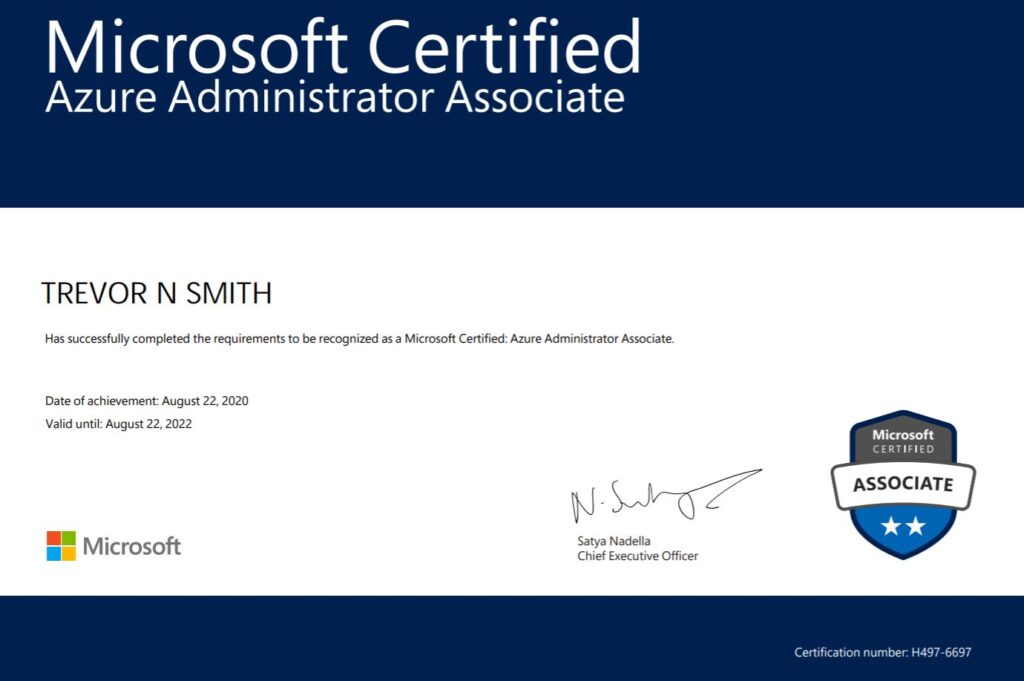
Microsoft Certified: Azure Administrator Associate – Exam Passed!

2020 Aug 23 By Deathmage85 0 comment

Created: 8/22/20

Today after a few months of off and on studying I’ve passed the Microsoft Certified: Azure Administrator Associate exam.

It was nice to get this behind me, onward to the 70-742 for the MCSA 2016.

https://www.youracclaim.com/badges/0770be45-45fa-47c8-9bc0-d8a387e7c269/public_url
Posted in Certifications, Uncategorized

Post navigation

VMware vExpert: Why you should apply?
Microsoft Certified: Solutions Associate – Server 2016 – Passed

Keyword Search

Certifications

  • Batch Programs: Making IT Automated.
  • Networking: Cisco and Dell N-Series L3 EtherChannel
  • VMware: Custom TCP/IP Stacks in VMware ESXi 6.0
  • Database fragmentation Percentage Query
  • Database re-indexing query
  • Desktop LAN Connection: develops the “(unauthenticated)” error
  • Equallogic Management: Mapping the SAN to a VM
  • Fully automated SQL Server Restore Script
  • Group Policy: Performance tweaks for 14% less memory usage
  • Home Lab
  • Home Lab 2.0: It’s evolved….
  • How to Check Local Group Policies Applied from Domain Controllers
  • How to Fix a Corrupt Profile in a Windows domain for a Server or Desktop
  • IPv6 General Transmit Failure bug
  • Microsoft SQL 2008 R2 won’t let you login after a server reboot…but why?
  • Outlook won’t allow you to send a attachment: here is a solution.
  • VMware: Physical to Virtual Conversion – All I need to do is a P2V right?
  • RAID Calculator
  • Restarting a Windows Printer Spooler Properly
  • Restoring a SQL database to another server from a SQL Backup
  • Setting Persistent Routes in a Windows PC/Server/VM that has Multiple Network Adapter’s for Multiple vLAN’s
  • Setting up a Login Script for Acitve Directory from the Sysvol (NETLOGIN) folder
  • SQL: Procedure sp_executesql: expects parameter ‘@statement’ of type ‘ntext/nchar/nvarchar’
  • Windows: Terminal Services GPO: Deploying Roaming Profiles, User Home Directory, and Session management
  • Windows: Terminal Services – Creating a Terminal Server Farm
  • Networking: Update a Cisco IOS on a Router
  • Networking: Upgrading Cisco IOS on a Catalyst 3750G L3 Switch
  • VMware vCenter: Physical or Virtual, you choose!
  • vForum 2015 – November 3rd – NYC
  • Virus Removal Guide
  • VMUG NY/NJ 2015
  • VMware Hardware Compatibility List
  • VMware Snapshot’s can be good but are also bad if left unchecked.
  • VMware vSAN: From Procuring the hardware, to Configuring the hardware, to Deploying vSAN, to Migrating VM’s in the Home-Lab (2 month weekend warrior project)
  • VMware: Setting up vLAN’s within a ESXi host for inter-vlan traffic
  • VMware: Time, what is this about time?
  • vSAN: Making a Dell R610’s PERC 6/i support SSD’s for VMware’s vSAN
  • Windows Domain Controller Operations Masters Placement and Verifying Windows Server “Operations Masters”
  • Windows Server/Desktop Performance Tweaks
  • Windows Updates: C:\ drive runs out of space, but why?
  • Windows Vista/7: Trust relationship between workstation and domain fails
  • Networking: Cisco and Dell N-Series L3 EtherChannel
  • Networking: Update a Cisco IOS on a Router
  • vSAN: Making a Dell R610’s PERC 6/i support SSD’s for VMware’s vSAN
  • VMware vSAN: From Procuring the hardware, to Configuring the hardware, to Deploying vSAN, to Migrating VM’s in the Home-Lab (2 month weekend warrior project)
  • Restarting a Windows Printer Spooler Properly
  • Setting up a Login Script for Acitve Directory from the Sysvol (NETLOGIN) folder
  • Networking: Setting up a 1 to 1 NAT with a WAN firewall rule on a Sonicwall
  • Networking: Setting up a SSL-VPN on a Sonicwall
  • Windows: Password Policy for Terminal Services
  • Windows: Server 2003 RDC error: “The RPC is unavailable”
  • Windows: Windows Authentication Error when connection to Windows Server 2016 from Windows 7
  • Windows: RepAdmin Commands to resolve Active Directory Replication issues
  • VMware: ESXi 6.5 Standby uplink bug for enabling non-vDS multipathing in Web Client
  • VMware: Converting Windows 2000 NT produces a “inaccessible_boot_device” error
  • Windows: Terminal Services – unexpected server authentication certificate error
  • VMware: vCSA Console won’t accept updated password, what do you do?
  • VMware: Setting up the NSX manager from CLI
  • Windows: How To activate Windows via Command Prompt
  • Cyber Security: Why is a SIEM solution important?
  • Cyber Security: Nmap commands for recon discovery during a vulnerability or penetration assessment
  • Cyber Security/Windows: Everyday security for RD[Protocol], but how?
  • Cyber Security/Networking: How to setup a Mirror port on a Cisco switch for use with a SIEM device
  • Cyber Security: How to use Wireshark
  • Windows: Enabling Schema Module for movement of FSMO role
  • Windows Server 2016/2019: How to fix a AD Replication Error 5
  • Cyber Security/Networking: Common Ports
  • Cyber Security: Test your AV!
  • Cyber Security/Networking/Windows: Is 802.1X important?
  • Cyber Security: So you say your using a complex password, are you really sure?
  • Windows/Cyber Security: Session Inactivity and Auto-logoff Policy
  • Cyber Security: Recommendations for Secure TLS
  • Cyber Security: Types of EAP Frameworks
  • Cyber Security: Types of Encapsulation used with EAP’s
  • Cyber Security: Secure-by-Design Recommendations
  • VMware/Networking: How to enable VLAN Guest Tagging with a Netgear M4300 Series switch and Windows Server 2016 with VMware ESXi 6.0
  • Cybersecurity: How do you check a file to verify it’s integrity?
  • Cyber Security/Windows/Networking: All-In-One Technical Toolkit
  • Cyber Security/Windows: Secure time for your Windows Server
  • Windows/Cyber Security: Enabling DNSSEC/DNS Sockets for greater DNS Integrity & Cache protection
  • Cyber Security: Enterprise Security Disciplines
  • Cyber Security: Risk Vocabulary
  • Windows/Cyber Security: Terminal Services Lockdown Policy
  • Cyber Security: Policy, Procedures, AND Processes OOO MY! O.O
  • Windows: GVLK Public keys
  • Windows: Server 2019 Time zone won’t change
  • VMware: Deploying Intel X710 DA2 CNA w/ v2.0.7 in ESXi 6.7U2/U3
  • Windows: Setting up “In-Motion” encryption on SMB-based files
  • Windows: Deploy a Domain Controller via Powershell
  • Windows: Deployment of a Nano Server with DNS
  • Windows: Prerequisites for a Nano Server
  • Windows: Deployment of Windows Server Core
  • Windows: Creating an Offline Root CA
  • Windows: Creating a Enterprise Subordinate CA of an Offline Root CA
  • Windows: Creating a Enterprise Subordinate (Policy) CA of an Offline Root CA for an Issuing CA
  • Windows: Creating an Issuing CA of a Enterprise Subordinate (Policy) CA
  • Windows/Cyber Security: What can you use PKI-based certificates for and how can they help with security?
  • Windows: Updates breaking your application? …Deploy a WSUS Server! (GUI-Based)
  • Windows: Updates breaking your application? …Deploy a WSUS Server! (Core-Based)
  • Windows/Cyber Security: Integration of Active Directory Services into a Sophos UTM using LDAP
  • Windows: Slow remote site login? …Enabling BrachCache might help!
  • Windows: Key Management Service – Software Licensing Manager
  • Windows: Moving Operation Master (FSMO) via Powershell
  • Windows: My C: Drive keeps filling up after each update on my server! …Maybe your WinSxS folder needs a clean up!!!
  • Windows: Create a Windows Server 2016 .wim image
  • Windows: How to create an Answer File with Window System Image Manager (SIM)
  • Windows: Using a System Imaging Manager (SIM) Answer file with System Preparation Tool (Sysprep) to create Server 2016 Template
  • Windows: Using the Microsoft Assessment and Planning toolkit (MAP) to take inventory of your network and to make improvements
  • Networking: How to setup a SNMP Community String on a Netgear switch
  • Windows: NTFS vs ReFS and example use cases for each
  • Storage: iSCSI vs FC
  • Storage: Best practices around iSCSI storage
  • Windows/Powershell: Automating the configuration of the 1st Domain Controller for a new domain
  • Windows/Powershell: Automating the configuration of a Secondary Domain Controller for a newly created domain
  • Windows: Creating a Pristine Image (.wim) with Microsoft Deployment Toolkit
  • Windows/Group Policy: The Importance of using the Loopback Policy
  • Windows/Powershell: Changing Remote Desktop Protocol Port based on Servers in a User Defined OU
  • Cyber Security/Networking: How to setup a Mirror port on a Netgear M4300 for use with a SIEM device
  • Cyber Security: Setting up a rule on a Sophos XG firewall to allow only internal DNS forwarder resolution
  • Cyber Security: Setting up a syslog collector on a Sophos XG firewall
  • Windows/Powershell: Automating the configuration of Windows Server Update Server (WSUS)
  • Windows/Powershell: Automating the configuration of a File Server with AES-CCM-based Signing and Encryption
  • Windows/Powershell: Automating the configuration of Print Server
  • Windows/Powershell: Automating the configuration of an Offline Root CA
  • Windows/Powershell: Automating the configuration of an Enterprise Intermediate CA joined to a Offline Workgroup Root CA
  • Windows/Powershell: Automating the configuration of DHCP Server with DNS
  • Windows/Powershell: Automating the configuration of 14 day Inactive User Query
  • Windows/Powershell: Automating the configuration of 1 months Inactive User Query
  • Windows/Powershell: Login and Logoff script for Users on a specific computer from a specified date
  • Windows/Powershell: Migrating Users in Windows Server 2008 R2 Active Directory to Server 2016 Active Directory
  • Windows/Networking: So called ‘Rogue DHCP’ can cause all your wonderful new-domain-in-series-with-old-domain plans to go up in smoke! … or you can do this!
  • Windows/Powershell: Allow ICMP through the default Windows Advanced Firewall to allow for pinging
  • Windows/Powershell: Allow printers on a printer server to be ‘list in the directory’ and change the default ‘autodetect’ print drivers
  • Windows: Folder Redirection Policy
  • Windows: KB4534271 Has Broken GPO Processing and Corrupt gpt.ini
  • Storage Best Practices
  • Windows/Cyber Security: Basics for deploying certificates via Windows Server Active Directory Certificate Services
  • Windows: Powershell Execution Policy & TLS 1.2 bypass
  • Windows/Cyber Security: types of system service accounts
  • Windows: Server Cleanup Script
  • Windows/Cyber Security: How to remote enable RDP on a server when you forget to enable RDP
  • Windows: Ultimate All-in-One IT Troubleshooting Toolkit script
  • Windows/Azure: Creating a Multi-forest integration with Azure with Azure AD Connect and custom UPN Suffix or Email attributes
  • Windows: How to Cleanup Metadata after a tombstoned or orphaned Domain Controller creates artifacts in your Active Directory Domain
  • Windows: Migrating from FRS to DFS-R
  • Windows/Cyber Security: Enable RRL to help mitigate DNS Amplification attacks
  • Windows/Powershell: Bulk Update SNMP on all domain-based servers
  • Windows: Microsoft File Server Migration Wizard
  • Windows/Powershell: How to find a Windows Server/Desktop trust with a domain controller
  • Windows: NTFS vs SMB Share – Permissions
  • Windows: Exchange Troubleshooting Toolkit Commands
  • Windows: Connecting to Exchange Online
  • Windows: Microsoft’s IdFix
  • Windows: IISCrypto
  • Windows/Azure: How to manually push On-premises changes to Azure using Azure AD Connect via Powershell
  • Windows/Exchange: How to setup SPF records for spam protection
  • Windows/Cyber Security: Windows Local Administrator Password Solution (LAPS)
  • Windows/Cyber Security: Folder Redirection Policy
  • Windows: Launching a Powershell script from a GPO
  • Windows/Exchange: Understanding DMARC and How to use it with your Exchange-based Email Solution alongside SPF, and DKIM
  • Windows/O365: Using Desktop Analytics
  • Windows/O365: Intune App Deployment: Microsoft Store App
  • Windows/O365: Intune App Deployment
  • Windows/PowerShell: Restarting a bank of computer based on AD-based name via Powershell
  • Windows/WSUS: Automatically pull WSUS Approved Updates and Then Install them and Then Reboot
  • Windows/WSUS: Force desktop to re-sync with WSUS server
  • Windows/WSUS: Creating Custom Index for a brand-new WSUS Server
  • Windows/WSUS: Weekly WSUS Cleanup Script
  • Windows/WSUS: Setting to configure for a brand-new WSUS Server deployment
  • Windows/Office 365: Enable RMS Templates for O365 Email Encryption via PowerShell
  • Windows/Office 365: Creating a DLP Policy and associated DLP Rule via Powershell
  • Windows/Office 365: Connect into Office 365 Security & Compliance via Powershell
  • Windows/PowerShell: How to Enable TLS 1.2 on a Server 2019
  • Windows/Office 365: Enable Exchange Online mailbox auditing
  • Windows/Azure: Setting up a Service Connection Point (SCP) to link to On-Premise Active Directory in Hybrid Mode to Azure for use with Intune
  • Windows/Security: Create a gMSA Service Account
  • Windows/Azure: Integrate an Azure Storage Account and its Azure File Share with on-premise Active Directory for use as the FSlogix profiles storage location
  • Windows/Azure: Integrating an Azure Storage Account into On-Premise Active Directory for use with Azure Virtual Desktop
  • Windows/Azure: Microsoft defender for endpoint service. error message: the service name is invalid.
  • M365/Exchange: Creating and updating Address Books
  • M365/Defender for Identity: Enable Advanced Audit Policies
  • Azure/Security: Restrict Guest User Access
  • M365/Exchange: Block Legacy Authentication
  • M365/Exchange: How to connect to Exchange Online (2023)
  • M365/Security: Prevent Sharepoint downloads that are infected
© 2026 | WordPress Theme : The Launcher